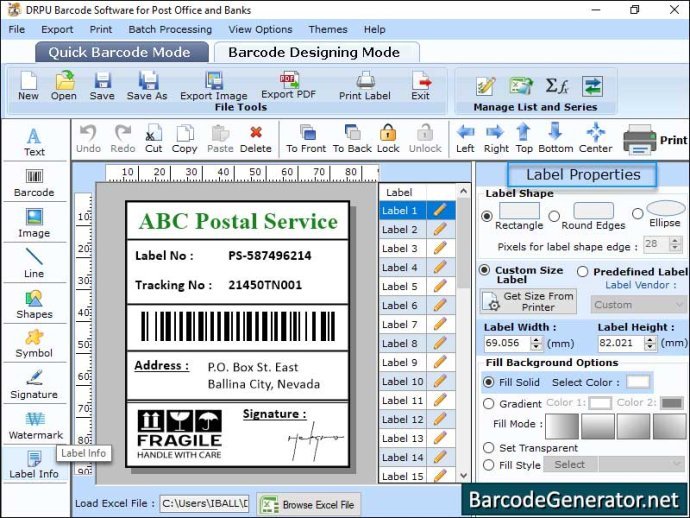
For any business relying on efficient, accurate data, the humble barcode is anything but simple. In an industrial setting, these patterns of lines and spaces are the lifeblood of inventory, asset tracking, manufacturing, logistics, and compliance. But generating them isn't as simple as clicking "create." Selecting and Using Industrial Barcode Generator Software wisely is a critical decision that impacts everything from supply chain efficiency to regulatory adherence and, ultimately, your bottom line.
Choosing the right software isn't just about getting a barcode that scans; it's about embedding intelligence into your operations, ensuring seamless data flow, and future-proofing your business against evolving demands. Get it wrong, and you face costly errors, production delays, and compliance headaches. Get it right, and you unlock new levels of efficiency and precision.
At a Glance: Key Takeaways
- Not All Barcodes Are Equal: Industrial needs demand specific barcode types (1D, 2D, QR, industry-specific) and robust generation capabilities that go far beyond basic retail.
- Scale and Scope Matter: Whether you're a small business managing inventory or a large enterprise with complex manufacturing, your software choice must match your current and future volume needs.
- Integration is King: Look for software that plays well with your existing ERP, WMS, or database systems to avoid manual data entry and errors.
- Quality & Compliance are Non-Negotiable: Industrial barcodes must be highly scannable, meet industry standards (like GS1), and often require high-resolution output for reliability.
- Cost vs. Value: While free online tools can be a starting point, dedicated industrial software offers advanced features, support, and scalability crucial for sustained operations.
- Key Players to Consider: Leading options include Labeljoy, Aeromium Barcode Maker, Wasp Barcode Maker, iBarcoder (for Mac), HandiFox, and enterprise solutions like Label Flow and EasyLabel.
Why Barcodes Matter More Than Ever in Industry
In today's fast-paced industrial landscape, every second counts, and every data point must be accurate. Barcodes are the linchpin of this operational precision, providing an automated method for identifying, tracking, and managing assets, products, and processes. Think about a bustling warehouse: thousands of items moving daily, each needing to be received, stored, picked, and shipped. Manual data entry for each transaction would be a recipe for disaster—slow, error-prone, and unsustainable.
Industrial barcodes transcend simple product identification. They can encode crucial information like batch numbers, expiration dates, serial numbers, destination details, and even full URLs or contact information in the case of 2D codes like QR or Data Matrix. This rich data makes them indispensable for:
- Inventory Control: Real-time visibility into stock levels, reducing overstocking or stockouts.
- Asset Tracking: Monitoring tools, equipment, and fixed assets throughout their lifecycle.
- Manufacturing & Production: Tracking work-in-progress, components, and finished goods, ensuring quality control and traceability.
- Logistics & Supply Chain: Expediting shipping, receiving, and order fulfillment across complex networks.
- Compliance & Traceability: Meeting regulatory requirements in industries like food, pharmaceuticals, and automotive, where knowing "who, what, when, and where" is non-negotiable.
The stakes are high. An unreadable barcode can halt a production line, cause shipping delays, or lead to misidentified assets, each carrying a significant financial and reputational cost. This is why the underlying software—the engine generating these critical identifiers—must be robust, reliable, and perfectly tailored to your industrial needs.
Beyond the Basics: What Industrial Barcode Generators Actually Do
When we talk about "industrial" barcode generator software, we're not just talking about a tool that spits out a simple UPC code for a retail product. We're referring to sophisticated applications designed to meet complex operational demands. These tools typically offer:
- Extensive Barcode Symbology Support: Beyond the common Code 128 or QR, industrial applications often require specialized codes like GS1 DataBar, Pharmacode, IATA (for airlines), Postnet (for postal services), or specific 2D codes for high-density data. A good generator will support a wide array of 1D and 2D codes, ensuring compatibility across various industry standards.
- High-Resolution Output: Industrial environments demand barcodes that are consistently scannable, even under challenging conditions (e.g., on curved surfaces, through plastic, or after wear and tear). The software must generate graphics with precise dimensions and high DPI (dots per inch) for optimal print quality.
- Advanced Data Handling: Instead of generating one barcode at a time, industrial solutions facilitate bulk generation from databases, spreadsheets, or ERP systems. They can handle variable data, allowing each barcode to carry unique information while maintaining a consistent format.
- Customization and Design Capabilities: Industrial labels often need more than just a barcode. They might require company logos, human-readable text, serialization, expiration dates, specific color coding, or even integration with RFID tags. The software should provide robust design tools to create complex, multi-element labels.
- Integration with Enterprise Systems: The true power of industrial barcode generation lies in its ability to integrate seamlessly with existing business software—Warehouse Management Systems (WMS), Enterprise Resource Planning (ERP), inventory databases, and shipping platforms. This eliminates manual data entry, reduces errors, and automates workflows.
- Compliance Features: Many industries operate under strict regulatory guidelines (e.g., FDA for pharmaceuticals, GS1 for supply chain). Industrial barcode generators often include features to ensure that generated codes meet these specific standards for data structure, format, and placement.
Without these capabilities, what might seem like a minor oversight in software selection can quickly become a significant operational bottleneck, impacting everything from throughput to compliance.
Decoding Your Needs: Essential Questions Before You Choose
Before diving into the myriad of options available, take a strategic pause. The best software isn't necessarily the most expensive or feature-rich; it's the one that perfectly aligns with your specific operational requirements. Ask yourself these critical questions:
1. What Barcode Types Do You Absolutely Need?
This is foundational. Different industries and applications demand different barcode symbologies.
- 1D (Linear) Barcodes: Good for encoding smaller amounts of data, primarily numerical. Common types include:
- Code 39, Code 128: General-purpose, alphanumeric. Code 128 is highly efficient and widely used in logistics and supply chain.
- EAN/UPC: Primarily for retail product identification globally.
- Interleaved 2 of 5 (ITF): Often used in warehousing and manufacturing for encoding pairs of numbers.
- GS1 DataBar: For small item identification, often carrying additional data like batch numbers or expiration dates.
- Pharmacodes: Specific to the pharmaceutical industry for packaging verification.
- Postnet, Royal Mail, Japan Post, Australia Post, Korean Post: For postal services.
- IATA codes: For airline baggage.
- 2D Barcodes: Store significantly more data, including text, URLs, and images, and can often be scanned even if partially damaged.
- QR Codes: Very popular for marketing, links, and general information, but also useful in industrial settings for larger data sets.
- Data Matrix: High-density, compact, widely used in electronics, aerospace, and medical devices.
- PDF417: Multilayer, high-capacity, used for identification cards and transport applications.
Self-clarification: Will you need specialized codes for banking, mobile tagging, or specific postal services? Ensuring the software supports all your required symbologies from day one is non-negotiable.
2. What's Your Operational Scale and Volume?
- Small Businesses/Occasional Use: Generating a few dozen labels a day for inventory or retail might be fine with a budget-friendly desktop application or even a free online tool (though these often lack bulk features).
- Medium-Sized Businesses: Regularly generating hundreds or thousands of labels for product lines, asset tracking, or warehousing requires more robust features, including batch generation and database integration.
- Large Enterprises/Manufacturing Firms: High-volume, complex operations generating tens of thousands of unique labels daily across multiple sites will need enterprise-grade solutions with advanced integration, centralized management, and high-speed printing capabilities.
3. What Are Your Integration Requirements?
Can the software connect with your existing systems?
- Spreadsheets (MS Excel) & Word: Many smaller businesses start here.
- Databases: Crucial for dynamic data generation (e.g., SQL, Access, Oracle).
- ERP (Enterprise Resource Planning) Systems: For manufacturing, supply chain, and financials (e.g., SAP, Oracle ERP Cloud).
- WMS (Warehouse Management Systems): For optimized inventory and logistics.
- Asset Management Software: For tracking tools and equipment.
- Custom Applications: Do you need an API or SDK to embed barcode generation into your own software?
Seamless integration prevents costly data entry errors and ensures your barcode data is always current and accurate.
4. What Output Quality and Compliance Standards Are Necessary?
- Print Resolution: For industrial applications, especially those requiring small barcodes or direct part marking, high-resolution output is critical for scannability. Look for software that can generate professional-grade graphics.
- Industry Certifications: Does your industry have specific requirements (e.g., GS1 standards for retail/supply chain, ISO standards for quality)? Some software is explicitly designed to meet these, offering peace of mind.
- Quiet Zones: Ensure the software allows for proper "quiet zones" (clear space around the barcode) to guarantee scannability.
5. What Platform Do You Operate On?
- Windows: Most desktop barcode generators are Windows-based.
- Mac: Specific software is available for Apple users (e.g., iBarcoder).
- Web-based/Online: Convenient for accessibility from anywhere, but often come with limitations for bulk generation or deep integration.
6. What's Your Budget?
- Free Online Tools: Excellent for small, occasional needs or initial testing, but often lack features, support, and integration.
- Budget-Friendly Desktop Software: Typically offers more features than free tools, suitable for SMBs.
- Mid-Range Solutions: Balance features and cost, often with good integration capabilities.
- Enterprise Solutions: High-priced but offer comprehensive features, robust support, scalability, and deep integration essential for large, complex operations.
7. Any Specific Industry Needs?
Are there unique demands from your sector? Retail often needs EAN/UPC, manufacturing might need Data Matrix for traceability, and logistics could require Code 128 with GS1 Application Identifiers. Some software specializes in these niches.
8. How About Future Scalability?
Choose a solution that can grow with your business. Migrating barcode systems later can be a complex and costly undertaking.
A Deep Dive into Top Industrial Barcode Generator Software
Based on diverse industry needs and user feedback, here’s a closer look at leading industrial barcode generator software, leveraging their strengths and ideal applications.
Best All-Around & Versatile Solutions
These tools stand out for their broad appeal and robust feature sets, catering to a wide range of industrial and commercial users.
- Labeljoy Barcode Generator Software:
- Ideal for: Small and large online and physical retailers, manufacturing, general office use.
- Strengths: Offers a rich variety of simple and creative barcode designs. What sets it apart is the ability to integrate images and clipart directly into labels, perfect for product branding or instructional labels. It's user-friendly while maintaining powerful features for high-volume needs.
- Key takeaway: If you need a blend of functionality and aesthetic flexibility, especially for consumer-facing labels or detailed internal tracking, Labeljoy is a strong contender.
- Aeromium Barcode Maker:
- Ideal for: Businesses requiring industry-certified, professional-quality barcodes at a budget-friendly price point, especially those in supply chains needing compatibility.
- Strengths: Creates high-resolution graphic output that meets rigorous industry specifications. It supports crucial types like EAN, Code 39, 128, and Modified Plessy, ensuring seamless compatibility with third-party supply chains. Often cited as a "Best Budget Buy" for Windows users.
- Key takeaway: For professional-grade, compliant barcodes without breaking the bank, Aeromium is an excellent choice for businesses prioritizing reliability and external compatibility.
For Inventory & Asset Management
These solutions are tailored for tracking physical assets, stock, and mobile inventory, where data accuracy and real-time visibility are paramount.
- Wasp Barcode Maker:
- Ideal for: Small and medium-sized businesses focused on robust inventory control and product barcode labels.
- Strengths: Known for its integration with MS Word and Excel, making it accessible for businesses already using these tools for data management. It's suitable for asset tracking, warehousing, retail, and general office use. While it might offer fewer generation options compared to some enterprise solutions, its focus on practical inventory solutions is a major plus.
- Key takeaway: If inventory management is your primary concern and you appreciate easy integration with common office tools, Wasp Barcode is a reliable, focused choice.
- HandiFox:
- Ideal for: Manufacturing firms needing advanced inventory control and sales tracking, particularly with mobile capabilities.
- Strengths: This desktop application excels in mobile inventory management and monitoring, effectively handling data flow from the warehouse to accounting. It's considered high-priced but offers advanced features that justify the investment for complex manufacturing environments.
- Key takeaway: For manufacturers who need sophisticated, mobile-enabled inventory and sales tracking, HandiFox offers significant value despite its cost.
- CheckMate Barcode Software:
- Ideal for: Organizations with specialized tracking needs, including law enforcement, construction, manufacturing, and even the US military.
- Strengths: Specialized for document, inventory, asset, equipment, and job tracking. Its robust nature caters to environments where precise tracking and auditing are critical.
- Key takeaway: If your organization has unique and demanding tracking requirements beyond standard inventory, CheckMate provides a purpose-built, high-reliability solution.
Enterprise & High-Volume Solutions
For large organizations with extensive operations, these systems offer the scale, integration, and advanced features necessary to manage vast quantities of data and complex workflows.
- Label Flow:
- Ideal for: Large retail and manufacturing firms requiring high-volume barcode and RFID label generation.
- Strengths: Generates thousands of codes, creates custom and pre-defined industry-standard labels, and conveniently links to database software for streamlined design and data management. It’s built for scale and complexity.
- Key takeaway: When you need a powerful engine for both barcode and RFID, capable of handling immense volumes and intricate label designs tied to your core databases, Label Flow delivers.
- EasyLabel:
- Ideal for: Both small and large firms needing an enterprise solution for generating RFID and barcodes, especially those with specific printer needs.
- Strengths: Often comes free with Thrao brand printers, making it an attractive package deal. It prints EAN and UCC barcodes with Application Identifiers, allows custom contact address layouts, and supports IP and terminal network printing for complex requirements.
- Key takeaway: For firms looking for a comprehensive, printer-integrated solution that handles complex barcode and RFID needs across networks, EasyLabel offers a robust, scalable platform.
Mac Users' Choice
Mac users have specific needs, and these tools cater directly to the Apple ecosystem.
- iBarcoder:
- Ideal for: Mac users across various sectors, including books, stickers, and retail products, who need a versatile and affordable barcode generator.
- Strengths: A top-rated barcode generator for Mac, it generates over 40 types of barcodes, including ISBN and QR codes. It supports industry-specific and custom labels, allowing for color labels of custom style, size, and shape. It offers good value with a lower price point, making it a "Best Budget Buy" for Mac devices.
- Key takeaway: If you're on a Mac and need a comprehensive yet budget-friendly solution for diverse barcode generation, iBarcoder is an excellent, feature-rich option.
- Iwinsoft Barcode Maker for Mac:
- Ideal for: Mac users needing a straightforward tool to create various standard barcodes.
- Strengths: Provides dedicated functionality for Mac devices, focusing on ease of use within the Apple environment.
- Key takeaway: A good alternative for Mac users seeking a native application for their barcode generation needs.
Free Online & E-commerce Options
For basic needs, quick generation, or small-scale e-commerce operations, free online tools can be incredibly useful, though they typically have limitations for industrial-scale use.
- Barcode-Generator (Free Online Tool):
- Ideal for: E-commerce stores, retailers, the airline industry, and US postal services needing a quick, free solution.
- Strengths: Generates QR codes for app stores, vCard, PDF, SMS, MP3 in JPG, EPS, SVG formats. Also supports Postnet Barcodes for US Postal Service, Pharmacodes, and IATA codes for airline baggage.
- Key takeaway: Highly versatile for specific, immediate needs, especially for web-based or postal applications, but not for bulk, integrated industrial use.
- Online Barcode Generator by Tec-IT:
- Ideal for: Generating various barcodes online for free, particularly for banking, mobile tagging, and postal mail for USPS, Royal Mail, Japan, Australia, and Korean posts.
- Strengths: Extensive symbology support, making it useful for niche requirements.
- Limitations: Lacks bulk barcode printing, making it suitable only for small inventories or occasional use.
- Key takeaway: Excellent for highly specific, one-off barcode generation with strong international postal support, but not a scalable industrial solution.
- Online Barcode Generator (UK-based):
- Ideal for: Small and medium-sized businesses looking for a free, web-based tool with a simple interface for common 1D and 2D barcodes.
- Strengths: User-friendly and accessible from any browser.
- Key takeaway: A good starting point for straightforward barcode generation without software installation, but expect limited advanced features.
- Barcode Maker Online by Barcodes Inc.:
- Ideal for: E-commerce businesses and anyone needing simple, printable, scannable barcodes in JPG and PNG formats.
- Strengths: Free and easy to use.
- Limitations: Supports a limited set of barcodes (Code 39, 128-A, B, C, and Interleaved 2 and 5), making it less suitable for diverse industrial needs. Also designated "Best for E-commerce."
- Key takeaway: Excellent for basic e-commerce product labeling, but too restrictive for broader industrial applications.
- Morovia Free Online Barcode Generator:
- Ideal for: Businesses needing a wide variety of free online barcodes, including many linear and business codes.
- Strengths: Creates Code 39, 128, UPC, EAN, Postal, Data Matrix, PDF417, QR, and others, including Monterey barcode generation. Also designated "Best for E-commerce."
- Key takeaway: A powerful free option for diverse barcode types, offering more versatility than some other online generators for testing or small-scale e-commerce.
Implementing Your Chosen Software: Best Practices for Success
Simply acquiring the software is just the first step. Effective Selecting and Using Industrial Barcode Generator Software means integrating it thoughtfully into your operations.
1. Designing Effective Barcodes
A barcode isn't just a design element; it's a data carrier that needs to be perfectly legible to automated scanners.
- Proper Quiet Zones: Ensure there's adequate clear space around the barcode (usually 10 times the width of the narrowest bar). This is crucial for scanners to correctly identify the barcode.
- Human-Readable Text: Always include human-readable text below the barcode. This acts as a fallback if the barcode is damaged or unscannable, allowing for manual entry.
- Optimal Size and Placement: Barcodes should be large enough to scan easily but not so large that they overwhelm the label or product. Consider the surface they'll be on and how they'll be scanned.
- Contrast: High contrast between the bars and spaces (dark bars on a light background) is essential. Avoid reflective or glossy surfaces that can interfere with scanning.
- Purpose-Driven Design: Tailor the barcode and label content to its specific function. For inventory, you might include part numbers and locations; for shipping, tracking numbers and destination.
2. Seamless Integration with Existing Systems
This is where the real efficiency gains happen. Your barcode generator shouldn't be a siloed application.
- Automate Data Flow: Link the generator to your inventory management system, ERP, or database. This allows for automatic data retrieval to populate labels, eliminating manual entry errors and speeding up the process. For instance, when a new product is added to your ERP, the barcode label can be generated automatically.
- API/SDK Utilization: If the software offers Application Programming Interfaces (APIs) or Software Development Kits (SDKs), leverage them to embed barcode generation directly into your custom applications or workflows.
- Batch Processing: Ensure your software can generate hundreds or thousands of unique barcodes from a data source (e.g., an Excel file or database query) in a single run.
3. Printing Considerations
The best generated barcode is useless if it's not printed correctly.
- Printer Type: Choose the right printer for your needs (thermal transfer for durable labels, direct thermal for temporary labels, inkjet/laser for general office use). Industrial settings often require thermal transfer printers for longevity.
- Label Stock: Select labels appropriate for the environment (e.g., waterproof, chemical-resistant, freezer-grade). The material impacts adhesion, durability, and print quality.
- Ink/Ribbon: Use high-quality ribbons for thermal transfer printers to ensure crisp, durable prints that resist fading and smudging.
- Printer Calibration: Regularly calibrate your printers to ensure consistent print quality and accurate barcode dimensions.
4. Rigorous Testing and Validation
Never assume a barcode is scannable until proven.
- Scanner Compatibility: Test generated barcodes with all the scanners you intend to use (handheld, fixed-mount, mobile devices). Different scanners might have varying tolerances.
- Data Accuracy: Verify that the data encoded in the barcode matches the human-readable text and the source data.
- Environmental Testing: If labels will be exposed to harsh conditions (extreme temperatures, moisture, abrasion), test their scannability after exposure.
- Regular Audits: Periodically audit your barcode generation and scanning processes to catch potential issues before they become widespread.
- The importance of robust barcode generation for systems like Cognex barcode generation cannot be overstated, as these high-performance scanners demand pristine labels for maximum efficiency.
5. Training Your Team
Even the most intuitive software requires proper training.
- User Training: Ensure all personnel involved in barcode generation, application, and scanning are thoroughly trained on the software, best practices, and troubleshooting common issues.
- Documentation: Create clear, concise internal documentation for your barcode generation processes.
6. Compliance and Standards
Adhering to industry standards is vital for interoperability and legal compliance.
- GS1 Standards: If you're in retail, healthcare, or logistics, understanding and implementing GS1 standards (for UPC, EAN, GS1-128, GS1 DataMatrix, etc.) is critical. Your software should support these.
- Other Industry-Specific Standards: Research and comply with any specific barcode standards relevant to your sector (e.g., AIAG for automotive, HIBCC for healthcare).
Common Pitfalls to Avoid When Generating Barcodes
Even with the right software, missteps can undermine your barcode system's effectiveness. Be vigilant against these common errors:
- Ignoring Quiet Zones: This is perhaps the most frequent mistake. Without adequate clear space around the barcode, scanners struggle to define the start and end of the code, leading to "no reads" or misreads. Always ensure your design software enforces the correct quiet zone.
- Poor Print Quality: Faded, smudged, blurry, or improperly scaled barcodes are unreadable. This can stem from low-quality printers, incorrect label stock, worn printheads, or insufficient resolution settings in the software. Regularly maintain printers and verify print quality.
- Choosing the Wrong Barcode Type for the Application: Using a 1D code when you need to embed significant data (e.g., a URL, expiration date, and batch number) will lead to frustration. Conversely, using a complex 2D code for a simple product ID might be overkill. Match the symbology to the data and application.
- Lack of Data Validation: Generating barcodes with incorrect underlying data is worse than no barcode at all, as it propagates errors throughout your system. Implement rigorous data validation checks before generation.
- Overlooking Integration Needs: Relying on manual data entry or copy-pasting for barcode generation creates inefficiencies and introduces human error. The goal of barcode software is automation; ensure it integrates with your primary data sources.
- Selecting a Solution Without Scalability: What works for generating a few labels today might collapse under the weight of thousands tomorrow. Choose software that can grow with your business volume and complexity without requiring a complete overhaul.
- Not Testing Across All Scanners: A barcode might scan perfectly with one type of scanner but fail with another. Always test generated labels with every scanner model your operation uses, especially handhelds and fixed-mount readers.
- Ignoring Environmental Factors: Labels that easily smudge, peel, or fade in your specific industrial environment (e.g., cold storage, high humidity, chemical exposure) will lead to unscannable products. Select appropriate label materials and protective coatings.
Frequently Asked Questions about Industrial Barcode Generators
Navigating the world of industrial barcodes often brings up specific questions. Here are some common ones:
What's the difference between 1D and 2D barcodes?
1D (Linear) barcodes like UPC, EAN, or Code 128 are horizontal lines of varying width, primarily encoding numerical or limited alphanumeric data. They typically point to a database record where more information is stored. 2D (Matrix) barcodes like QR codes or Data Matrix are square or rectangular patterns of dots or cells. They can store significantly more data directly within the barcode itself, including text, URLs, images, or even small documents, making them ideal for high-density information or offline use.
Can I use an online generator for industrial needs?
For very small inventories, one-off projects, or specific non-critical needs (like generating a single QR code for a marketing campaign), free online generators can be useful. However, for true industrial applications—high volume, bulk generation, integration with databases, compliance, and guaranteed print quality—online tools are generally insufficient. They lack advanced features, customization, and the security or support needed for production environments.
How do I ensure my barcodes are scannable?
Focus on print quality (high contrast, crisp lines), correct quiet zones, appropriate size, and testing. Use industrial-grade printers (thermal transfer) with quality ribbons and labels suited for your environment. Regularly verify print quality and scan all barcodes with your actual scanning equipment before deployment.
What about RFID vs. Barcodes?
Barcodes are line-of-sight optical systems, requiring a scanner to "see" and read each code individually. They are cost-effective and widely adopted. RFID (Radio-Frequency Identification) uses radio waves to automatically identify and track tags attached to objects. RFID tags can be read without a direct line of sight, from greater distances, and multiple tags can be read simultaneously. While more expensive, RFID offers greater automation and speed. Many enterprise solutions like Label Flow and EasyLabel support both, allowing businesses to leverage the strengths of each technology.
Is free software ever enough for industrial use?
Generally, no. While free online tools are great for personal use or very small, non-critical applications, they typically lack the bulk generation capabilities, database integration, advanced design features, technical support, and the output quality controls necessary for reliable industrial operation. The cost savings are often outweighed by increased errors, operational inefficiencies, and potential compliance issues. Investing in purpose-built industrial software is usually a necessity for robust and scalable operations.
Your Next Steps: Making an Informed Decision
Navigating the landscape of industrial barcode generator software can feel overwhelming, but by approaching it strategically, you can make a choice that truly benefits your business. Start with a crystal-clear understanding of your specific needs, your operational scale, and your integration priorities.
Don't rush the decision. Take the time to:
- Map Your Requirements: Detail all the barcode types you need, the volume of labels, the systems you need to integrate with, and any compliance mandates.
- Evaluate Top Contenders: Use the insights from this guide to narrow down your choices. Consider Labeljoy or Aeromium for all-around versatility and quality, Wasp Barcode Maker or HandiFox for inventory specifics, or Label Flow and EasyLabel for enterprise-level demands. Mac users should explore iBarcoder.
- Request Demos and Trials: Most reputable software providers offer demos or free trials. Take advantage of these to test the software with your actual data and workflows.
- Consider Total Cost of Ownership: Look beyond the initial purchase price. Factor in training, integration costs, ongoing support, and the cost of potential errors if the software isn't robust enough.
- Think Long-Term: Choose a solution that can scale with your growth, adapting to new barcode types, higher volumes, and evolving system integrations.
The right industrial barcode generator software is an investment in accuracy, efficiency, and the seamless flow of data that underpins modern operations. Make that investment wisely, and you’ll see the returns every single day.